YOUR CART: 0 products
Home › SUPPORT FORUMS › James wp theme › Page background slider option not working wordpress 3.8!?
This topic contains 16 replies, has 5 voices, and was last updated by  kevin(Staff) 7 months, 4 weeks ago.
-
AuthorPosts
-
12/01/2014 at 8:56 PM #13625
Hi, I am running James 2.0 as new install on wordpress 3.8. I want to have a slideshow on home page as full screen background with a bit text on every slide over the image and a link to a dedicated page when cliking on the slide.
I tried to use the james page options - slider options but whatever I out in there is showing on the content block as slideshow and not on the background full screen.
What to do and how to create the above - since I saw the same in your demo and decided to purchase it due to that.
Appreciate your quick help and support.
All the best,
Chris
13/01/2014 at 9:40 AM #13629Hi Christian,
Is this the page from our demo website you are referring to? http://theme-dutch.com/presents/james/fs-portfolio-content/
If not, please do link me towards the one you meant. That way I’ll be able to give you some detailed instructions.
If this is the one, here’s how we made it.
This is created using a simple page. With content for the text that’s on top of the background slider. The slider itself was made using the background option in the page options.
-Scroll down the page a little bit until you hit James Page options. In there you’ll also find “Background”.
- for the background type you want to choose “Gallery” You’ll now be able to set up your background gallery for the page
- Select a time interval between your slides, choose a transition and add your images.
- Last, save the page and you should have a working background gallery.
One more thing though. You’re using James2.0 on a WP3.8 installation. Do note that James is not yet ready and tested for wp3.8, you might experience some incompatibilities due to this while we are still developing the update.
Kind regards,
Kevin
13/01/2014 at 12:40 PM #13635Hi Kevin,
thanks for quick reply.
Question 1: when will the James update for WP 3.8 be ready?
The slide you are showing is not the one I am looking for since this is a simple gallery.
I am looking for these two slideshow options:
And:
Where the 58 stands I want to put some text /name.
Thanks for help.
Rgds
14/01/2014 at 11:08 AM #13639Hi Christian,
1 - As for the update, I cannot give an accurate ETA at this point. We are currently working on several theme updates and we’re trying to get them all through as quickly as we can but we want to do it properly. As I’m not sure when it will be done, I don’t want to be making any false promises.
2- Could you please link me towards tha page you mean at http://theme-dutch.com/presents/james/ ? That way I’ll be sure to explain the correct thing to you.
Kind regards,
Kevin
01/02/2014 at 9:52 AM #62469HI Kevin,
just click on one of the picture with the red haired ladies on the top brick line and you will come to a slider with arrow left/right navigation and the option to put some text on the picture and to click on it and be linked to another page.
All this does not work in my WP 3.8…
Can you pls check?
Thank you!
Best
Christian01/02/2014 at 12:41 PM #62476Hi Christian,
Could you please insert your purchase code into your profile details for verification?
A new update for James has just been released to Mojo-themes and Mojo-marketplace. This update is WP3.8 compatible. Have you tried using that new theme version yet?
The gallery type we have set our homepage up to use is called “Boxes” you should find it in your theme options. The text displayed in the white box after opening one of these boxes is the topic title
Kind regards,
Kevin02/02/2014 at 2:12 PM #62486Hi Kevin
here it is:
***********************
Altered by Kevin
***********************I have not received any email informing me about the update!?
How can I get it?All the best,
Christin03/02/2014 at 9:05 AM #62490Hi Christian,
You can get the update by downloading the theme files again from mojo-themes.
As you have already purchased the theme you can re-download it there for free.Kind regards,
Kevin04/02/2014 at 12:54 PM #62493Hi Kevin,
I have a question about my page on this link http://markogavrilovic.com/bull/.
When I go to edit page, I don’t have edit page button I have edit media. Also in dashboard, when I go to pages, I see this page as it was before, but when I click to update it I’m directed again to media, http://markogavrilovic.com/bull/, where I don’t see a right sidebar roll, I see only these two images instead of more than ten that I have in dashboard.Do you have an idea how to resolve this?
Thanks
MarkoAttachments:
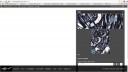
markogavrilovic2.jpg
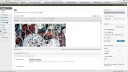
markogavrilovic1.jpg
04/02/2014 at 1:58 PM #62496Hi Marko, can you add your purchase code
04/02/2014 at 3:16 PM #62500Hi Marko,
We can only provide support to our verified customers.
Could you please follow our verification procedure for the James theme?
- post on the support tab of James on Mojo-themes http://www.mojo-themes.com/item/james-2-0-responsive-full-screen-portfolio-woocommerce-theme/ asking for buyer verification, mentioning your theme-dutch.com username.
- Reply here when you’ve posted on mojo-themes so we’ll know to go verify your status as a paying customer.This somewhat detoured way of verification is our only way of verifying your account since mojo-themes does not have a purchase code system we can use for automatic verification.
Thank you in advance
Kind regards,
Kevin04/02/2014 at 5:19 PM #62505Hi Mike,
it was two years ago. I hope that I can find it!
Kevin didn’t asked for this on my earlier discussions and questions on your old website.
I’ll start to review my old emails to find this info.
Thanks
Marko04/02/2014 at 6:08 PM #62506Hi Kevin,
I don’t know how to do that…but I find the purchase details and I’m sending you this in the attachment.
Is this ok?05/02/2014 at 9:58 AM #62512Hi Marko,
Thanks, that worked. As you’ve purchased the theme a while ago, that was still on the themeforest marketplace. James has now moved to mojo-themes which is probably where the comfusion was caused. Themeforest has a nice system that allows us to verify your purchase and the file you shared included your themeforest purchase code. I’ve gone ahead and added it to your profile information and have verified you as a themeforest customer.
I’ve looked into your issue and it does seem a little odd. in wordpress there’s a difference between pages and media. Media are items like images that you’ve uploaded. these items can all individually be viewed is if they were a page and I believe that’s what you’re looking at. Hence the edit media instead of edit page. However, as you do have an actual page with the name /bull/ thats a bit strange. It sounds as though you’ve got two pages with the same url (the actual page and the media-page) but I don’t know whether that’s even possible..
Have you tried deleting the page you’ve got now and creating a new one? Also, could you check on the edit media part if it shows a permalink for your media item, of so, is that the same one as your page called bull?
Kind regards,
Kevin05/02/2014 at 7:46 PM #62519Hi Kevin.
In a meanwhile I resolved this, now I see that you also advised me to try to delete the page and to create a new one.
Worked for me!
And yessss,now I’m verified
Thanks
Kind regards
Marko -
AuthorPosts



You must be logged in to reply to this topic.