YOUR CART: 0 products
Home › SUPPORT FORUMS › Aziza WordPress theme › TDS-folio hover color not working
This topic contains 6 replies, has 2 voices, and was last updated by  kevin(Staff) 4 months ago.
Viewing 7 posts - 1 through 7 (of 7 total)
-
AuthorPosts
-
03/06/2014 at 7:41 AM #64234
Please move this question to the general aziza support forum. I dont find the way to do it.
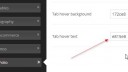
Hi, i have an issue with the color of the “Tab hover text” (TD Folio), I set any color and it is not shown. See the attached images.
thanks
- This topic was modified 4 months ago by rioma. Reason: Please move this question to the general aziza support forum. I dont find the way to do it
-
This topic was modified 4 months ago by kevin(Staff).
Attachments:
tdfolio1.jpg

tdfolio2.jpg
03/06/2014 at 12:56 PM #64241Hi rioma,
Could I ask you what version of the Aziza theme you are using? The theme received an update to v1.2.4 just today. When I go and alter the tab hover color on our demo site it does properly change on the front-end.
Kind regards,
Kevin03/06/2014 at 2:56 PM #64247I’ve updated to 1.2.4 but the issue still continue. Anyway no matter, we find another colour combination that works for me.
But I have two more questions about TD folio:
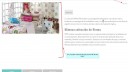
- the two small rectangles in the top right must be the left and right arrow buttons. But the two symbols are not displayed, why? (see the image attached)
- is it possible to make that the animation of the featured picture fill all this white area?
thanks.
Attachments:
tdfolio3.jpg
04/06/2014 at 7:33 AM #64249If you want visit the site: http://www.rioma.com/corp/portfolio/mimi/
04/06/2014 at 9:59 AM #64250Hi Rioma,
The two arrows are normally made using a specific webfont. When I open the console in my browser (f12 -> console | In chrome) I can see an error appearing that your website is somehow unable to access a file that contains this webfont. The file might be missing.
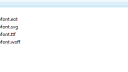
Could you check the following folder on your ftp, see what’s in there (and if it even exists). ../wp-content/plugins/td-shortcodes/fonts/
I took a screenshot of its contents on our installation.
As for the featured image, I’m afraid that right at this moment is has a limited space. I do like the idea of having a large portrait image in there so I’ll post it as a suggestion for our developers to take a look at.
Kind regards,
Kevin
Attachments:
ScreenShot619.png
04/06/2014 at 10:34 AM #64253Yes, I checked this folder and we have all those files there. It’s strange, I don’t know what may be happen. And, as you can see, the fonts in the rest of the web look fine.
05/06/2014 at 10:00 AM #64272That’s quite odd..
Could you perhaps try re-installing the update for me? We’ve had some odd things happen sometimes due to files getting corrupted in down- or upload. I’d like to make sure that’s not the case here first.
Just download a fresh version of the theme from themeforest, then remove your currently installed version from your FTP and upload the newly downloaded version.
See if anything changes.Kind regards,
Kevin -
AuthorPosts


Viewing 7 posts - 1 through 7 (of 7 total)
You must be logged in to reply to this topic.